
Are you looking for a betting tracker in Excel that can keep track of your bets, stakes and results? A betting spreadsheet can give you a valuable overview of profit, ROI and win rate. But you do not have to build formulas and dashboards yourself. With BetAddo, you get a digital betting tracker where your most important statistics are calculated automatically, and you can create a free account.
Free digital betting tracker
Betting tracker in Excel – track odds, profit and ROI
What is an Excel betting tracker?
An Excel betting tracker is a spreadsheet in which you record all your bets. Each row typically represents one wager, while the columns contain information such as the date, match, bookmaker, odds, stake and result. When the spreadsheet is set up correctly, it can calculate whether you are making an overall profit or loss.
The purpose is not simply to count winning and losing bet slips. A good betting tracker allows you to evaluate your results over a longer period and discover whether, for example, you perform better on certain sports, leagues or betting markets.
A simple Excel sheet is therefore far better than not recording your bets at all. The challenge is that the spreadsheet requires manual entry, correct formulas and ongoing maintenance.
How to create a betting tracker in Excel
You can build a basic betting tracker in Excel or Google Sheets in just a few steps. The most important thing is to use a consistent structure and record every wager – including small, impulsive and losing bets. If you only enter selected bet slips, your statistics will be misleading.
1. Create one row for each bet
Each wager should be recorded separately. This also applies when you place several bets on the same match. This allows you to filter the data later by sport, bookmaker, bet type and period without mixing different wagers together.
2. Add the most important columns
At a minimum, your Excel betting tracker should contain the information needed to calculate your result and analyse your betting. A simple setup may include the following fields:
Date
When the bet was placed
When the bet was placed
Match or event
The event the bet applies to
The event the bet applies to
Selection and market
For example, over 2.5 goals
For example, over 2.5 goals
Odds
The decimal odds taken
The decimal odds taken
Stake
Amount or number of units
Amount or number of units
Bookmaker
Where the bet was placed
Where the bet was placed
Result
Won, lost or void
Won, lost or void
Profit
Profit or loss on the bet
Profit or loss on the bet
A more advanced spreadsheet may also include sport, league, bet type, pre-match or live, unit size, closing odds and a comment about the reasoning behind the bet. The more fields you add, the more analyses you can perform – but recording each bet also becomes more time-consuming.
3. Use fixed values for results
Use a dropdown menu with fixed results such as won, lost, void, half won and half lost. This reduces inconsistent wording and makes it easier to use filters and pivot tables.
4. Add formulas for profit and ROI
For a standard winning bet, profit can be calculated as stake × odds − stake. For a losing bet, profit is equal to the negative stake. Your total ROI is calculated as total profit divided by total stake multiplied by 100.
For example, if you have staked £10,000 and achieved a total profit of £500, your ROI is 5%. This means that, on average, you have made £5 in profit for every £100 staked.
Which figures should your betting spreadsheet show?
A betting tracker becomes truly valuable when it turns your entries into useful key figures. At a minimum, you should be able to track the following:
Total profit or loss
The most important figure is your overall financial result. A positive balance with one bookmaker does not necessarily tell the whole story if you have losses with other operators. All wagers should therefore be included in the same betting record.
ROI
ROI shows your return relative to the total amount staked. This makes it useful for comparing different periods, sports and strategies, even when your stake levels differ.
Win rate and average odds
Win rate is the percentage of settled bets you have won. It cannot be assessed in isolation. A 45% win rate may be strong at high average odds, while a 60% win rate may still produce a loss if the odds are too low. Win rate should therefore always be viewed alongside average odds and ROI.
Results by sport, league and bet type
By categorising your wagers, you can investigate whether you perform better on football than tennis, on the Premier League rather than the Champions League, or on over/under markets rather than match winners. This can reveal strengths and weaknesses that are difficult to identify from memory alone.
Advantages of keeping a betting tracker in Excel
Excel is a flexible and familiar solution that many people already have access to. You control the structure and can add exactly the columns, formulas and charts you want.
- Full control: You decide how the spreadsheet should be built.
- Flexible analysis: Use filters, pivot tables and charts.
- No new platform: Work in software you already know.
- Offline access: A local Excel file can be used without an internet connection.
- Better discipline: Recording your bets makes you more aware of your stakes.
For highly systematic bettors, Excel can therefore be a powerful tool. However, it requires the spreadsheet to be maintained correctly and consistently.
Disadvantages of an Excel betting tracker
The biggest disadvantage is the manual work. Every time you place a wager, the details must subsequently be found and entered into the correct fields. If you skip an entry, your betting record quickly becomes incomplete.
- Formulas can be overwritten or produce errors.
- New statistics require additional setup.
- The spreadsheet can become difficult to manage as the number of bets grows.
- Entering bets on a mobile device is often cumbersome.
- Bets from multiple bookmakers must be combined manually.
- Charts and dashboards must be built and maintained.
Excel is therefore a good place to start, but many people find that the manual process eventually causes them to stop updating their records.
Excel or BetAddo: Which should you choose?
The choice depends on how much you want to build and maintain yourself. Excel offers maximum freedom, while BetAddo is designed specifically for recording and analysing bets.
Feature
Excel
BetAddo
Bet registration
Manual
Fast
AI bet slip scanning
No
Yes
Profit, ROI and win rate
Custom formulas
Automatic
Filters and charts
Build them yourself
Built in
Mobile access
Cumbersome
Mobile-optimised
Community and leagues
No
Yes
Use BetAddo as your digital betting tracker
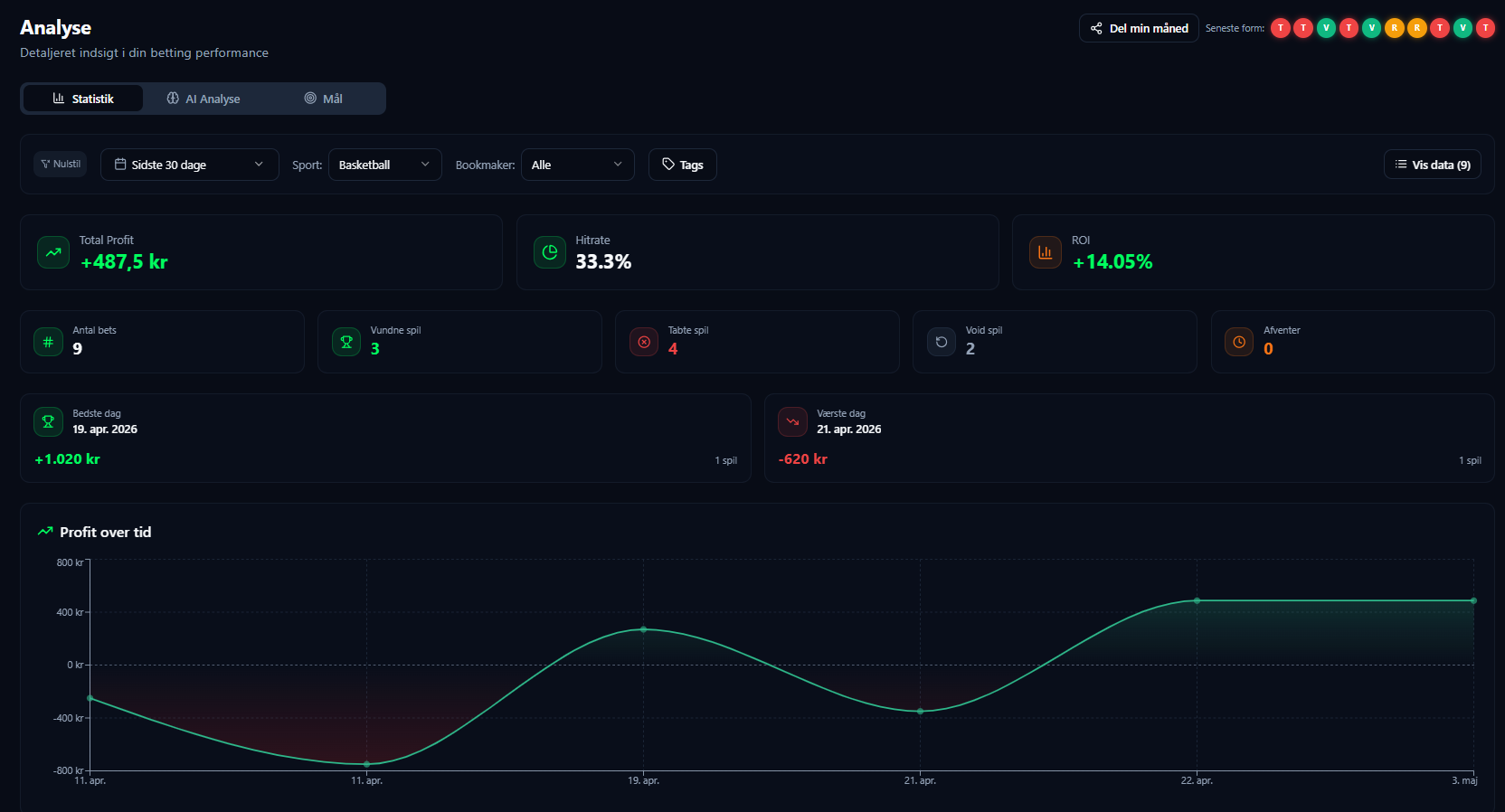
BetAddo works as a digital alternative to a traditional Excel betting tracker. You record your wagers on the platform, after which profit, ROI, win rate and other key statistics are calculated automatically.
This means you do not have to maintain formulas or build dashboards yourself. At the same time, you can combine bets from different bookmakers and get one complete overview of your betting.
Record bets faster with the AI bet slip scanner
The most time-consuming part of a betting tracker is often data entry. With BetAddo’s AI bet slip scanner, you can upload an image of a bet slip. The system helps read details such as the match, market, odds and stake, allowing you to verify the information and record the bet more quickly.
View profit, ROI and win rate automatically
Once the bet and result have been recorded, BetAddo updates your key figures. You can follow your overall development and filter your data by period, sport and bookmaker, among other criteria. This gives you a more accurate picture than simply looking at your account balance with each bookmaker.
Find patterns in your betting data
Once you have recorded enough bets, the data may reveal patterns. Perhaps your pre-match bets perform better than your live bets. Maybe you achieve a positive ROI in certain leagues while other markets drag your result down.
A betting tracker cannot guarantee winning wagers. It can, however, help you base your decisions on actual results rather than isolated big wins or gut feeling.
Keep track of your bankroll
BetAddo makes it easier to monitor your bankroll and work with a fixed unit size. This can support more structured stake management and reduce the risk of suddenly increasing your stakes after a loss or a short run of good results.
More than a standard betting spreadsheet
BetAddo combines a personal betting tracker with features that a standard spreadsheet does not normally include:
- Personal goals: Set targets for profit, ROI or activity.
- Private bets: Keep all wagers private whenever you choose.
- Bet feed: Share selected bets and analysis with other users.
- Leaderboards: Compare results by profit, ROI and other key figures.
- Friends leagues and competitions: Compete with friends or other users over a selected period.
You can therefore use BetAddo as a completely private betting tracker or combine tracking with the platform’s community features.
How to get started with BetAddo
It only takes a few steps to replace or supplement your Excel sheet with a digital betting tracker:
- Create a free account: Sign up for BetAddo and choose your username.
- Record your first bet: Enter the wager manually or use the AI bet slip scanner.
- Record the result: Mark the bet as won, lost or void.
- Track your statistics: View profit, ROI, win rate and performance in your dashboard.
The more wagers you record, the more reliable your data becomes. It is therefore important to record both good and bad bets consistently.
Why you should record every bet
People often remember big wins more clearly than the many smaller losses. Gut feeling can therefore give you an inaccurate impression of your actual betting results.
A complete betting record removes much of this uncertainty. It shows whether you are genuinely profitable, which types of wagers perform best and how much variance you experience along the way.
You should therefore also record live bets, accumulators, small stakes and wagers placed without detailed analysis. Otherwise, you risk analysing a more flattering but less accurate version of your results.
What should a good betting tracker be able to do?
Whether you choose Excel or a digital betting tracker, the solution should make it easy to:
- Record consistently: It should be realistic to record all your bets.
- Calculate automatically: Profit, ROI and win rate should be accurate.
- Filter results: View data by period, sport, league, market and bookmaker.
- Track your bankroll: Maintain an overview of your total betting bankroll.
- Use your data actively: The figures should help you understand your habits and results.
BetAddo brings these features together in one platform that you can start using for free.
Start 100% free
Leave the manual Excel spreadsheet behind
Create your free account, record your first bets and automatically track profit, ROI and win rate.
18+ | Gamble responsibly | ROFUS.nu | StopSpillet.dk
BETTING TRACKERAI BET SLIP SCANNERROI & PROFITBANKROLLBETTING ANALYTICSLEADERBOARDSFRIENDS LEAGUESFREE ACCESS
BETTING TRACKERAI BET SLIP SCANNERROI & PROFITBANKROLLBETTING ANALYTICSLEADERBOARDSFRIENDS LEAGUESFREE ACCESS
Have any questions?
Frequently asked questions about Excel betting trackers
Create one row for each wager and columns for the date, match, selection, odds, stake, bookmaker, result and profit. Then use formulas to calculate total profit, ROI and win rate.
At a minimum, it should include the date, wager, odds, stake, bookmaker, result and profit. A more advanced spreadsheet may also include sport, league, bet type, units, live or pre-match and closing odds.
For a winning single bet, profit is calculated as stake multiplied by odds minus the stake. For a losing bet, the result is the negative stake. Void bets normally produce a profit of £0.
ROI is calculated by dividing your total profit by your total stake and multiplying the result by 100. If you have £500 in profit after total stakes of £10,000, your ROI is 5%.
Excel can be a good starting point because you control the setup. However, it requires manual entry, correct formulas and ongoing maintenance. As the number of bets grows, a dedicated betting tracker may be easier to keep updated.
Yes. BetAddo works as a digital betting tracker where profit, ROI, win rate and other statistics are calculated automatically. You can also use the AI bet slip scanner to record bets more quickly.
Yes. You can create a free account and start recording bets and tracking your results. A Pro membership is also available for users who want more advanced features.
Yes. You can combine wagers from different bookmakers in BetAddo and track your overall result in one place. This provides a more accurate overview than looking at each bookmaker balance separately.
No. A betting tracker cannot guarantee profit or winning wagers. It helps you create an overview, analyse your results and make more data-driven decisions. Betting always involves the risk of loss.